
Estimates & Invoices - Get Paid On Time Every Time | ReConto PRO

Get Paid On Time, Every Time

Send professional estimates, track approvals, and manage payments—all from one platform.

❌ The Pain

  • Chasing down estimate approvals via text and email
  • Creating invoices manually in Excel or Word
  • Not knowing which estimates were approved or ignored
  • Payments delayed because invoices weren't sent on time
  • No organized history of what was billed and paid

"Disorganized billing = slow payments."

🤖 The Solution

  • Create professional estimates linked to project milestones
  • Send for approval with one click—client approves from phone
  • Track approval status in real-time
  • Generate invoices instantly from approved estimates
  • Optional: Collect payments online with Stripe or mark manual payments

"Professional billing = faster payments."

✅ The Result

  • Get paid faster with clear, approved estimates
  • Less time creating invoices manually
  • Complete history of billing and payments
  • Professional image with branded documents
  • Better cash flow tracking

Organized billing = Healthy business.

Standalone or Project-Linked: You Decide

Use estimates and invoices standalone for quick jobs, or link them to project milestones for complex work. Either way, everything stays organized in ReConto PRO.
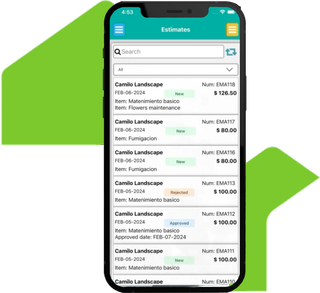
Estimates and invoices dashboard

Professional Billing From Your Phone

Create estimates with your branding, send for approval, and convert to invoices in seconds. Track which clients approved, which are pending, and which payments are overdue—all from your phone.

How Estimates & Invoices Work in ReConto PRO

  1. 1

    Create estimate with line items, costs, and payment terms

  2. 2

    Send to client—they receive link via email or text

  3. 3

    Client reviews and approves from their phone (no account needed)

  4. 4

    Once approved, generate invoice with one click

  5. 5

    Get paid: Stripe (online) or mark manual payment (cash, check, transfer)

  6. 6

    Track everything: approved, invoiced, paid, overdue

Estimate approval workflow

When This Makes a Big Difference

  • Multi-phase projects with progress payments

  • Busy clients who need to approve from mobile

  • Professional documents for your business

  • Clear trail of what's approved and billed

Milestone-Based Estimates

Link estimates to project phases for clear payment schedule


Client Approval Tracking

See which estimates are approved, pending, or rejected


Auto-Generated PDFs

Professional branded estimates and invoices

Billing features

And more

Payment Options

Stripe (online) or manual (cash, check, Zelle)


Cash Flow Visibility

Track what's billed, paid, and overdue


Professional Appearance

Impress your clients with clean, customized estimates and invoices

Billing features

Why Managing Estimates and Invoices Is Critical for Service Providers

In the residential services industry, completing a job is only part of the challenge—getting paid quickly and without conflicts is equally important.

According to Field Service News, more than 40% of service technicians spend between 4 and 8 hours a week chasing unpaid invoices. That time could be used to grow the business or serve more clients.

Additionally, QuickBooks research shows that companies accepting online payments get paid 5 to 10 days faster on average than those relying on checks or cash.

Problems Caused by Poor Payment and Documentation Management

1. Cash Flow Interruptions

Waiting weeks to get paid can paralyze small businesses and prevent growth.

2. Higher Risk of Disputes

FreshBooks reports that 16% of manual invoices are disputed or never collected due to unclear terms.

3. Loss of Professional Credibility

Informal estimates and handwritten invoices damage your reputation with high-value clients.

4. Administrative Overload

Manually tracking estimates, payments, and reminders consumes valuable time.

How ReConto PRO Simplifies the Process

Instead of creating each document from scratch, ReConto PRO uses information you ALREADY have in the project:

  • Project scope → Becomes line items in estimate
  • Defined milestones → Become payment schedule
  • Approved change orders → Automatically added to invoice
  • Photos and evidence → Attached as backup for completed work

Two Payment Options: Stripe or Manual

ReConto PRO gives you complete flexibility:

Option 1: Online Payments with Stripe

  • Client pays with card through secure link
  • Automatic tracking of each payment
  • Stripe sends reminders for pending payments
  • You see in real-time which invoices are paid

Option 2: Manual Payments

  • Mark manually when you received payment (cash, check, Zelle, transfer)
  • Send reminders by email from ReConto
  • Complete control without processing fees
  • History of pending payments

Key Benefits of Using ReConto Pro for Financial Management

1. Get Paid Faster

Clients pay much faster when they receive clear invoices and can pay online in seconds.

2. Reduce Disputes and Misunderstandings

By clearly documenting scope, costs and terms from the start, you avoid conflicts and legally protect your business—as recommended by the National Association of Home Builders (NAHB).

3. Improve Your Professional Image

Offering polished estimates and invoices positions you as a credible and trustworthy provider, helping you win more clients.

4. Save Time on Administration

Spend less time chasing payments and more time growing your business. Automated systems eliminate tedious manual work.

Common Mistakes to Avoid When Managing Payments

  • Not Defining Clear Payment Terms: Always specify due dates, deposits, and late payment penalties in your estimates.
  • Relying Only on Cash or Checks: Offering only traditional options delays collections and increases cancellations.
  • Not Following Up: Without automatic reminders, late payments get forgotten, affecting cash flow.

Formalizing your financial processes isn't a luxury—it's essential to stay competitive. ReConto Pro helps you get paid faster, reduce disputes, and grow your business.

Frequently Asked Questions

Yes. They receive a secure link and can approve with one click from their phone.

No. Online payments with Stripe are optional. You can mark manual payments (cash, check, Zelle, transfer) and still track everything in ReConto.

Yes. Add your logo, brand colors, and custom payment terms. Documents look professional and match your business.

ReConto is built specifically for residential contractors. Estimates link to project milestones, approvals happen in-app, and everything connects to your project documentation—not just accounting.