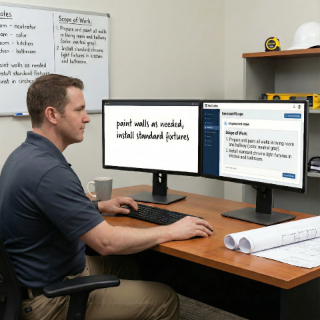
Co-write with AI: professional documents, no stress
Turn vague notes into clear scopes, professional contracts, and approval-ready change orders. AI helps you write like a pro—faster.
Build a clear schedule from your scope so everyone knows what to do and when.
"Without a plan, everything feels urgent."
"When the plan is clear, everything moves faster."
Your job days stop feeling chaotic.
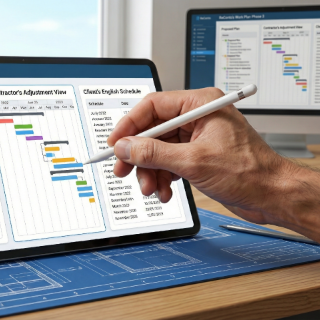
Instead of complex Gantt charts nobody opens, ReConto PRO gives you a structured list of tasks, visits, and checkpoints connected to your scope and contract. You can see phases, assign owners, estimate durations, and convert everything into a calendar of site visits. The goal is simple: fewer surprises, fewer 'who was supposed to be there?', and a clear plan that fits the way small and mid-size contractors actually operate.
Every task in the plan is connected to the scope and contract, so nothing important is left undocumented.
See your work plan on a calendar to coordinate crews, subcontractors, and inspectors across multiple jobs.

Group visits by area and day to reduce driving time and keep technicians focused on billable work.
Track who moved which visit, when, and why, so you can explain schedule changes to clients with facts instead of guesses.
Start from the signed contract and scope so your work plan reflects what the client actually approved
Use AI suggestions to break the project into phases, tasks, and visits based on the type of work and your typical patterns
Assign owners, estimate durations, and define simple dependencies (what must be done before the next step)
Convert tasks into a shared calendar of visits, inspections, and client meetings available from web and mobile
Adjust the plan as conditions change and keep a history of schedule changes, reasons, and approvals
Turn vague notes into clear scopes, professional contracts, and approval-ready change orders. AI helps you write like a pro—faster.

ReConto’s AI summarizes messages and documents, then recommends what to do next so nothing slips through the cracks.

Detects risks, estimates timelines, and flags vague terms before they become expensive problems. Smart help, without losing control.

Two remodeling crews are booked for the same house because the plan was only in a notebook. With ReConto, both see the same updated work plan and calendar
A landscape company wastes hours driving back and forth across town. With ReConto, they group maintenance visits by area and day
An HVAC contractor forgets to schedule inspections early enough and has to pause work. With ReConto, inspections are tasks in the plan, not an afterthought
A handyman business cannot explain to a client why the job is late. With ReConto, they can show the history of weather delays, client-requested changes, and rescheduled visits
Many contractors invest time in selling, estimating, and negotiating, but when it comes to execution, the plan is little more than a start date and a hope that things will flow smoothly. Crews are told, "we start Monday," and then everyone reacts to whatever happens that week: materials that are late, clients who are not home, inspectors who are booked, and weather surprises.
The result is constant rescheduling, frustrated clients, and lost margin hidden in unplanned downtime.
The alternative is not an over-engineered project management system that nobody has time to maintain.
What most residential contractors need is a practical work plan: a clear sequence of tasks, owners, and visits that can be updated quickly as reality changes.
Cost #1: Idle crews and overtime
When tasks are not sequenced, workers arrive on site without the conditions or materials they need. They wait, leave early, or rush later with overtime to catch up.
Cost #2: Constant context switching
Without a clear plan, owners and project managers jump between jobs all day, answering urgent questions instead of focusing on strategic issues and quality.
Cost #3: Damaged client trust
Clients don't expect perfection, but they do expect to know what will happen this week. When every visit is a surprise, they lose confidence in the team.
A solid work plan for a typical remodel, addition, or exterior project doesn't need hundreds of lines. It needs a clear structure that everyone understands. For example, a kitchen remodel work plan in ReConto might be organized into phases such as:
Each phase is then broken into tasks with owners and expected durations. ReConto links these tasks back to the scope and contract so it's obvious which part of the work each activity supports.
Building a work plan from scratch for every job can feel like extra work. That's why many contractors skip it. ReConto PRO uses AI to do the heavy lifting based on your project type, location, and previous jobs.
For example, when you create a new bathroom remodel, the system can propose a default sequence of phases and tasks, pre-fill durations, and suggest when inspections or client walkthroughs should happen.
You stay in control. You can delete tasks that don't apply, adjust durations based on your crew size, and insert special steps for this particular client or house. Over time, the patterns you accept most often become your new "standard playbook," making each new work plan faster to create.
The work plan in ReConto PRO is not isolated. Each visit in the calendar can generate notes, photos, and checklists that go back into the project record. If a visit reveals a condition that requires extra work, you can trigger a potential change order right from that task, keeping the financial side aligned with the schedule.
For companies managing multiple crews across a city, the work plan also supports better routing. You can see which jobs are planned for each day and adjust assignments to reduce unnecessary travel.
The goal is not just to "have a plan," but to convert that plan into fewer miles, fewer surprises, and more consistent experiences for your clients.
ReConto PRO focuses on the level of detail most residential contractors actually use: clear tasks, visits, owners, and dependencies. It is lighter than a traditional Gantt tool but powerful enough to coordinate crews, subcontractors, and inspections.
Yes. You can view your work plan as a list of tasks or as a calendar with planned visits, making it easier to coordinate routes, travel time, and client availability.
The AI analyzes your scope, contract, and typical patterns for similar projects to suggest phases, sequence of tasks, and realistic durations. You can accept, edit, or reject suggestions at any time.
Yes. Field teams and subcontractors can access assigned tasks, addresses, and notes from the ReConto mobile apps, helping them know where they need to be and what they need to do each day.
You can move tasks and visits, record the reason for the change, and optionally link it to a change order. This helps you maintain a factual history of delays and their impact on the project.